
Stream Seamlessly on the Go: The Top IPTV Applications for Android Users

Discover the Best IPTV Apps for Android: Stream Your Favorite Shows Seamlessly
If you're on the hunt for the best IPTV apps for your Android device, you're in luck. The world of streaming technology has evolved, and there are now numerous options that allow you to watch your favorite TV shows and channels with ease. Here's a rundown of some top-notch IPTV apps that promise a seamless streaming experience.
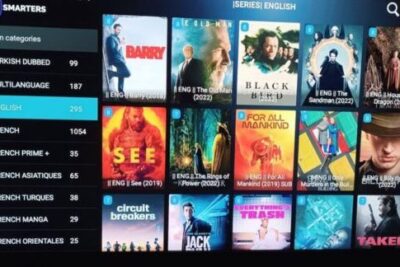
First up is IPTV Smarters Pro, a user-friendly app that works flawlessly on Android devices. It supports multiple playlists and offers a sleek interface that makes navigation a breeze. With features like parental control and external player support, it's a versatile choice for family households.
Another great option is GSE Smart IPTV, known for its robust functionality and compatibility with various formats. It supports Chromecast, offers automatic live stream reconnection, and even allows you to import your own channel lists.
For those who prioritize a straightforward and no-frills experience, Perfect Player IPTV might be the way to go. It provides a simple, minimalist interface while still offering powerful features like EPG support and scalable OSD.
Don't overlook XCIPTV Player, which stands out with its integrated Ott Navigator and support for multiple accounts. This app is perfect for users looking to personalize their streaming experience with custom branding options.
Lastly, Lazy IPTV is a solid choice for those who prefer a lightweight app. It supports M3U playlists, EPG, and even Internet radio, making it a comprehensive tool for all your streaming needs.
Each of these IPTV apps offers unique features tailored to different preferences, ensuring that you can find the perfect one to stream your favorite shows seamlessly on your Android device.
What are the top IPTV applications available for Android devices?
Some of the top IPTV applications for Android devices include VLC Media Player, which is known for its versatility and compatibility with various file formats; IPTV Smarters Pro, offering a user-friendly interface and support for multiple accounts; and GSE Smart IPTV, which provides extensive customization options and EPG support. Other notable mentions are XCIPTV Player and Perfect Player IPTV, both of which offer advanced features for a seamless streaming experience.
How can I set up an IPTV service on my Android smartphone or tablet?
To set up an IPTV service on your Android smartphone or tablet, follow these steps:
1. Download a reliable IPTV app from the Google Play Store, such as VLC Player or IPTV Smarters.
2. Obtain the IPTV subscription details, including a URL or playlist file (usually in M3U format) from your IPTV service provider.
3. Open the IPTV app and navigate to the section where you can add a new playlist or stream.
4. Enter the provided URL or upload the playlist file to load your IPTV channels.
5. Wait for the channels to load, then select one to start watching.
Ensure you have a stable internet connection for the best streaming experience.
Are there any free IPTV apps for Android, and what features do they offer?
Yes, there are several free IPTV apps for Android, such as VLC Media Player, Kodi, and IPTV. These apps typically offer features like live TV streaming, support for multiple playlists formats (e.g., M3U), Electronic Program Guides (EPG), and the ability to play a wide range of video codecs. However, users must provide their own content or playlist links, as these apps do not include IPTV channels by default.

Unlocking the World of Streaming: A Comprehensive Guide to SS IPTV APK
Exploring the Versatility of Android Tipo B: The Future of Universal Connectivity
10 Essential Android Productivity Tips to Supercharge Your Workflow
Reviving Retro Texting: How the Android T9 Keyboard is Making a Comeback
Mastering Android Image Handling: Tips and Techniques for App Developers
Exploring the Best Android Apps for Reddit Enthusiasts: A Comprehensive Guide
Go up
Deja una respuesta