

Mastering Android Development: Essential Tips and Tricks Every Developer Should Know


Essential Android Development Tips for Efficient App Creation
When embarking on the journey of Android development, it's crucial to adopt practices that streamline the process and enhance the quality of your applications. Here are some essential tips for efficient app creation:
1. Embrace the MVVM architecture (Model-View-ViewModel) to ensure that your code is clean, manageable, and easily testable. This separation of concerns makes it easier to maintain and scale your application.
2. Utilize Kotlin as your primary programming language. Kotlin is designed to be fully interoperable with Java while offering more concise syntax and reducing common programming headaches such as null pointer exceptions.
3. Leverage the power of Android Jetpack components to follow best practices, reduce boilerplate code, and write code that works consistently across different versions of Android.
4. Implement Continuous Integration/Continuous Deployment (CI/CD) pipelines using tools like Jenkins, CircleCI, or GitHub Actions. This automates your testing and deployment processes, ensuring that you can frequently release updates with confidence.
5. Write unit and UI tests to catch bugs early in the development cycle. The Android testing framework provides a robust foundation for writing tests that cover a wide range of scenarios.
6. Optimize your app's performance by profiling with Android Studio's Profiler. This tool helps you identify bottlenecks in your app's performance, such as slow layout rendering or excessive memory usage.
7. Pay attention to material design guidelines to ensure your app not only functions well but also provides an intuitive and visually appealing user experience.
8. Keep your codebase healthy with regular code reviews and refactoring sessions. This practice encourages knowledge sharing among team members and helps maintain high code quality.
9. Use dependency injection frameworks like Dagger or Hilt to manage object creation and lifecycle. This results in more modular and testable code.
10. Stay updated with the latest Android APIs and features. Google frequently updates the Android platform, so taking advantage of new features can keep your app ahead of the competition.
11. Optimize your app for different screen sizes and densities by using responsive layouts and drawable resources. This ensures a consistent user experience across a wide range of devices.
12. Minimize the use of third-party libraries to reduce the size of your app and potential security vulnerabilities. When necessary, choose well-maintained libraries with a strong community and support.
13. Pay close attention to app security. Store sensitive data securely, use network security measures like HTTPS, and always keep user privacy in mind.
14. Monitor your app's usage and crashes with tools like Firebase Analytics and Crashlytics. These insights can guide your development priorities and help improve your app's stability.
15. Engage with the Android development community. Participate in forums, attend conferences, and contribute to open-source projects to stay connected with industry trends and best practices.
Fastest Way to Become Android Developer in 2025 🔥
What are the best practices for optimizing Android app performance?
To optimize Android app performance, follow these best practices:
1. Profile Your App: Use the Android Profiler in Android Studio to identify performance bottlenecks.
2. Reduce Layout Complexity: Simplify your view hierarchy for faster rendering.
3. Optimize Bitmaps: Scale down images and use appropriate image formats.
4. Avoid Memory Leaks: Use LeakCanary or similar tools to detect memory leaks.
5. Use Multithreading: Offload heavy operations to background threads using AsyncTask or Kotlin coroutines.
6. Optimize Database Queries: Use indices and avoid complex queries on the main thread.
7. Minimize the Use of Wake Locks: Avoid draining the battery by minimizing wake locks.
8. Efficient Networking: Use caching and minimize data transfer with techniques like data compression.
9. Use ProGuard: Enable ProGuard to reduce the APK size and protect your code.
10. Test Performance: Regularly test your app's performance across different devices and OS versions.
How can developers effectively manage memory usage in Android applications?
Developers can effectively manage memory usage in Android applications by:
1. Using Profilers: Utilize Android Studio's built-in profilers to monitor app memory usage in real-time and identify memory leaks.
2. Optimizing Bitmaps: Scale down images and use `BitmapFactory.Options` to load the size that is necessary for the device's screen.
3. LeakCanary Integration: Implement LeakCanary to detect memory leaks automatically during the development phase.
4. Avoiding Memory Leaks: Be cautious with context references, static variables, and listeners which can easily cause leaks if not managed properly.
5. Using WeakReferences: When referencing objects that should be garbage collected, use `WeakReference` or `SoftReference`.
6. Proper Lifecycle Management: Ensure components like activities, fragments, and services are properly destroyed when not in use.
7. Collection Usage: Be judicious with the use of collections; consider using more memory-efficient alternatives like primitive arrays or SparseArray.
8. Threading: Offload heavy operations to background threads to keep the UI thread responsive and prevent memory overflow.
By focusing on these strategies, developers can maintain a smooth user experience and minimize the risk of out-of-memory errors.
What are some useful tips for debugging Android apps efficiently?
To debug Android apps efficiently, consider the following tips:
- Use the Android Studio Debugger to set breakpoints and step through your code.
- Leverage Logcat within Android Studio to filter and search for logs from your application.
- Employ Lint to scan for potential bugs in your XML files and source code.
- Utilize Unit Tests with JUnit to isolate and fix issues at the method level.
- Implement Espresso for UI tests to ensure that the user interface behaves as expected.
- Take advantage of Crash Reporting tools like Firebase Crashlytics to get real-time reports on issues users encounter.
- Profile your app with the Android Profiler in Android Studio to identify performance bottlenecks.
- Always test your app on different API levels and screen sizes to catch device-specific issues.

Mastering Your Smartphone Camera: Essential Android Photography Tips for Stunning Shots
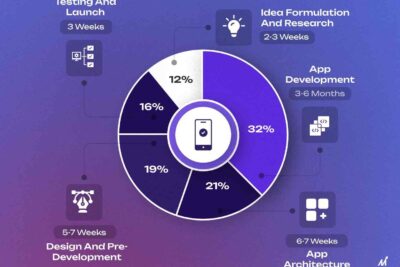
Top Android Development Tips for Building Better Apps in 2024

Unlocking Android 14's Full Potential: Top Tips and Tricks Sourced from Reddit Power Users

Choosing the Right Charger for Your Android Device: Types and Tips for Optimal Performance

Unlocking the Potential of Android Type-C: The Future of Connectivity and Charging

Unlocking the Full Potential of Your Living Room: A Comprehensive Guide to Android TV
Go up
Deja una respuesta