

Mastering Android Development with Python: Your Ultimate Guide to Building Apps with Ease


How Python Can Enhance Your Android Development Experience
When it comes to Android development, Java and Kotlin are the go-to languages. However, Python can also play a significant role in enhancing your Android development experience. With tools like Chaquopy or Kivy, Python can be used to develop native Android apps.
Using Python for Android development allows you to leverage its simplicity and vast ecosystem of libraries. For instance, Python's numerous libraries and frameworks can be incredibly useful for tasks such as data analysis, machine learning, and image processing within an app. This is particularly beneficial if you're looking to incorporate complex features like artificial intelligence or data visualization into your Android applications.
Moreover, Python's syntax is clear and concise, which can make your codebase much easier to maintain and scale. This can lead to faster development times and fewer lines of code compared to Java or Kotlin. Additionally, Python's cross-platform nature means that you can use many of your Python scripts across different platforms, not just Android, which can be a huge advantage in a multi-platform development strategy.
Another aspect where Python shines is in scripting and automation during Android development. You can write Python scripts to automate repetitive tasks such as testing, building, and deploying your Android applications. This can save you a considerable amount of time and reduce the risk of human error.
Furthermore, Python's interactive shells and REPL (Read-Eval-Print Loop) features allow for rapid prototyping and debugging, which can be a boon during the development process. You can quickly test out new ideas or debug existing code snippets without having to compile and run the entire application, which is often a time-consuming process with Java or Kotlin.
In conclusion, while Python may not replace Java or Kotlin for Android development, it certainly has the potential to complement them and enhance your overall development workflow. By integrating Python into your Android development toolkit, you can enjoy increased productivity, a more streamlined codebase, and the ability to easily incorporate advanced features into your apps.
Convert Python to Android with WINDOWS & LINUX + Fix Common Bugs
How can I use Python to develop Android applications?
You can use Python to develop Android applications by leveraging tools like Kivy or BeeWare. Kivy is an open-source Python library for developing multitouch applications which is cross-platform and can be deployed on Android. BeeWare allows you to write your app in Python and then deploy it on multiple platforms, including Android. Additionally, you can use PyQt or SL4A (Scripting Layer for Android) for more complex applications that require access to native APIs. However, for performance-critical apps, you might consider using Java or Kotlin, as they are the native languages for Android development.
What are the best libraries or frameworks for integrating Python code with Android?
The best libraries or frameworks for integrating Python code with Android are Kivy, which allows for the development of multi-touch applications, and BeeWare, which enables you to write native Android apps in Python. Additionally, SL4A (Scripting Layer for Android) and PySide can be used for simpler integration and scripting tasks on Android devices.
Are there any performance considerations when running Python scripts on Android devices?
Yes, there are several performance considerations when running Python scripts on Android devices. Android devices typically have limited resources compared to desktop computers, so Python scripts may run slower, especially if they are resource-intensive. Additionally, the Python runtime needs to be installed on the device, either through an app like Pydroid or QPython, which can also affect performance. It's important to optimize your code for efficiency and consider using tools like Cython or PyPy to improve execution speed. Lastly, keep in mind that not all Python libraries are compatible with Android, so you may need to find alternatives or workarounds.

Mastering Your Smartphone Camera: Essential Android Photography Tips for Stunning Shots
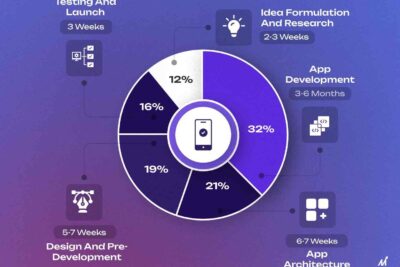
Top Android Development Tips for Building Better Apps in 2024
Unlocking Android 14's Full Potential: Top Tips and Tricks Sourced from Reddit Power Users

Choosing the Right Charger for Your Android Device: Types and Tips for Optimal Performance
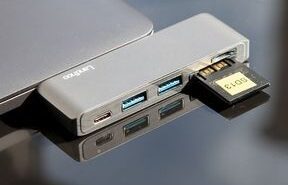
Unlocking the Potential of Android Type-C: The Future of Connectivity and Charging
Unlocking the Full Potential of Your Living Room: A Comprehensive Guide to Android TV
Go up
Deja una respuesta