

Lost and Unpowered: A Step-by-Step Guide to Locating Your Turned-Off or Dead Battery iPhone

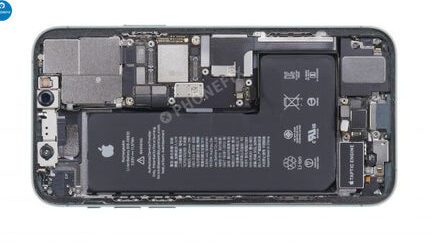
Locating Your iPhone When It's Turned Off or Has a Dead Battery
If you've ever misplaced your iPhone and it's turned off or has a dead battery, you might think it's impossible to locate. However, with the advancements in Apple's Find My network, finding a powered-down iPhone is no longer just a wishful thought.
Firstly, ensure that you have the Find My iPhone feature enabled on your device. This can be done by going to Settings, tapping on your name at the top, then going to Find My and toggling on Find My iPhone. Also, make sure to enable Send Last Location, which automatically sends the location of your iPhone to Apple when the battery is critically low.
For iPhones running on iOS 13 or later, Apple introduced a feature that allows the device to be located even after it has been turned off. This is because the iPhone remains partially functional to maintain its location capabilities. To find your iPhone, use another Apple device or access iCloud.com from a web browser. Sign in with your Apple ID and navigate to the Find iPhone section. Here, you'll see a map with the location of your devices.
If your iPhone is running iOS 15 or later, it utilizes the Find My network to relay its location through Bluetooth signals sent to nearby Apple devices, even when it's turned off or has a dead battery. These devices then anonymously send the location information to iCloud, allowing you to see your iPhone's last known location.
In case your iPhone is indeed dead, the last known location should give you a starting point to begin your search. If you believe your iPhone is nearby but simply out of charge, you could try calling it or using the Play Sound feature on the Find My app, though this will only work if your iPhone has enough battery power left to emit sound.
Remember, these features are designed to respect user privacy, so while they leverage a network of millions of Apple devices, individual locations are not compromised. The process is encrypted and anonymous, ensuring only you can access your iPhone's location.
By taking advantage of these built-in tools provided by Apple, locating your iPhone when it's turned off or has a dead battery becomes a much more manageable task. Always keep your device's settings optimized for such situations, and you'll have peace of mind knowing that you have the means to find your iPhone when needed.
What are the initial steps to take when trying to locate an iPhone with a dead battery?
If you're trying to locate an iPhone with a dead battery, the initial steps are to:
1. Visit icloud.com/find on a computer or use the Find My app on another Apple device.
2. Log in with your Apple ID and password.
3. Select the missing iPhone from the list of devices.
4. If the phone had Send Last Location enabled before the battery died, you might see its last known location.
Remember, once the battery is dead, the phone cannot send a current location. Always ensure Find My iPhone and Send Last Location are enabled on your iPhone for better chances of locating it when lost.
Can I use Apple's Find My network to find my iPhone if it's turned off or the battery is dead?
Yes, you can use Apple's Find My network to locate your iPhone even if it's turned off or the battery is dead. With iOS 15 and later, iPhones have a feature that allows them to be found for a limited time after being powered off or when the battery is depleted by emitting a Bluetooth signal that can be detected by nearby Apple devices on the network.
Are there any third-party tools or services that can help locate an iPhone that has been turned off or has a dead battery?
Yes, there are third-party tools and services that claim to help locate an iPhone even when it's turned off or has a dead battery, such as those offered by some security companies and device trackers. However, their effectiveness may vary and often depend on the phone having at least some residual power or having been previously set up with the service. For the most reliable solution, it's recommended to use Apple's Find My network, which can locate devices even after they've been powered off, assuming the feature was enabled before the phone was turned off or ran out of battery.

Rev Up Your iPhone: The Top 0-60 Timer Apps to Track Your Speed Demons
Maintaining Privacy: How to Prevent Call History from Syncing Across Your iPhones

Uncovering the Clues: How to Tell if Someone Has Deleted Your Number on Their iPhone

Silencing the Chatter: How to Disable WhatsApp Call History on Your iPhone for Enhanced Privacy Management

Fixing the Flicker: How to Troubleshoot Your iPhone's Green Screen Glitch

iPhone Power Button Woes: A Step-by-Step Guide to Diagnose and Fix Functionality Problems
Go up
Deja una respuesta