

Top Privacy Extensions for Firefox: Enhancing Your Online Security and Anonymity

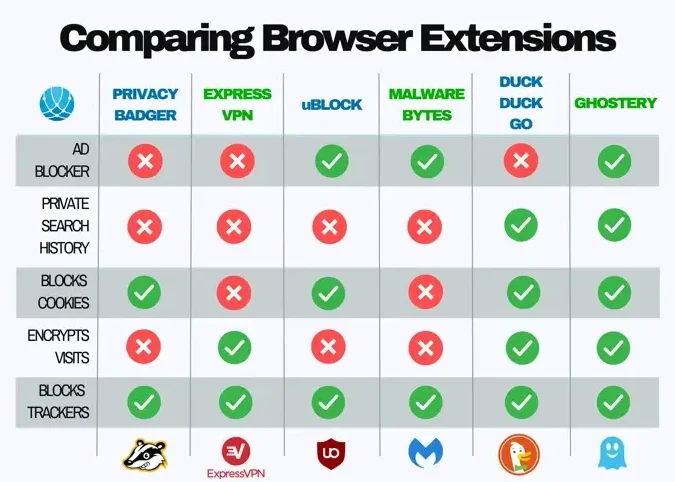
Top Firefox Privacy Add-ons to Secure Your Online Browsing
When it comes to securing your online browsing, Firefox stands out with its commitment to user privacy. A plethora of add-ons are available to enhance this aspect further. Here are some of the top Firefox privacy extensions that you should consider:
1. uBlock Origin - This efficient blocker goes beyond simple ad blocking by also preventing trackers from monitoring your online activity. It's lightweight and easy to use, making it a favorite among privacy enthusiasts.
2. Privacy Badger - Developed by the Electronic Frontier Foundation (EFF), Privacy Badger automatically learns to block invisible trackers and control third-party tracking cookies, ensuring that your browsing habits remain private.
3. NoScript Security Suite - This powerful tool gives you control over what scripts run on the websites you visit, protecting against XSS and Clickjacking attacks by allowing JavaScript, Java, Flash, and other plugins only for trusted domains of your choice.
4. HTTPS Everywhere - Another EFF creation, HTTPS Everywhere ensures that you are always connecting to the secure version of a website whenever possible, encrypting your communications and protecting against many forms of surveillance and account hijacking.
5. DuckDuckGo Privacy Essentials - This extension offers a comprehensive privacy solution by enforcing smart encryption, blocking trackers, and providing a privacy grade rating for websites based on their use of encryption and tracking practices.
6. Cookie AutoDelete - When you close a tab, Cookie AutoDelete automatically removes cookies that are no longer needed from your browser, preventing tracking companies from using them to follow your online trail.
7. Decentraleyes - Decentraleyes protects you against tracking through "free" centralized content delivery networks by serving local versions of common libraries and resources, thus avoiding the need to connect to these potentially tracking-enabled services.
8. Facebook Container - Specifically designed to contain Facebook and prevent it from tracking your visits to other websites with third-party cookies, this extension is essential for users who want to keep their browsing habits separate from their social media activity.
By integrating these privacy extensions into your Firefox browser, you can significantly reduce your digital footprint and protect your personal information from prying eyes. Remember, maintaining online privacy is an ongoing process, and these tools are just the starting point in taking control of your digital life.
What are the top three privacy extensions for Firefox to protect online data and browsing activities?
The top three privacy extensions for Firefox to protect online data and browsing activities are:
1. uBlock Origin - A powerful ad blocker that also prevents trackers from monitoring your online activity.
2. Privacy Badger - Automatically learns to block invisible trackers and control invasive ads and scripts.
3. HTTPS Everywhere - Ensures you're connecting to websites over a secure, encrypted connection whenever possible.
How do the best privacy extensions for Firefox enhance user anonymity and security on the internet?
The best privacy extensions for Firefox enhance user anonymity and security by blocking tracking cookies, preventing fingerprinting techniques, and encrypting your data. They often include features like automatic ad blocking and disabling social media trackers, which can otherwise monitor your browsing activities across different sites. Additionally, these extensions can force HTTPS connections where available, further securing the data you transmit from potential eavesdroppers. By doing so, they help maintain your online privacy and protect your personal information from unauthorized access.
Can the leading privacy extensions for Firefox block trackers and ads without compromising browser performance?
Yes, leading privacy extensions for Firefox can block trackers and ads effectively without significantly compromising browser performance. However, the impact on performance may vary depending on the extension's efficiency and the number of filters used.

Viewing Download History In Google Chrome Downloads

Browsing In Incognito Mode On PC For Private Web Surfing

Customizing The Background Image In Google Chrome

Resetting The Default Theme In Google Chrome
Go up
Deja una respuesta